How Webcam Hand Tracking Works
Webcam hand tracking works by running two small neural networks on your camera feed: a palm detector finds where the hand is in the frame, and a landmark model then predicts 21 keypoints — the wrist plus four joints per finger — for that hand. Both networks run on every video frame, fast enough for real-time control, and entirely on your own device: no video is uploaded anywhere. This is exactly the pipeline inside Gesture Synth Weld, where the 21 points become pitch, filter, and note gates — and in this guide we open up each stage, with the published numbers behind it.
The dominant implementation is Google's MediaPipe Hands (now the MediaPipe Hand Landmarker), whose design and benchmarks are documented in the MediaPipe Hands paper. The numbers below come from that paper, Google's official model card and documentation, and independent validation studies — sources are linked throughout.
What you'll learn:
- ✓ How a webcam feed becomes 21 hand keypoints, stage by stage
- ✓ Why two small models beat one big one for real-time tracking
- ✓ The published speed and accuracy numbers, by device
- ✓ How keypoints become pitch, volume, and note gates in a gesture synth
- ✓ What lighting, occlusion, and hand speed do to tracking — and the fixes
- ✓ Why on-device tracking is private by architecture
- ✓ A 5-point self-check you can run in under a minute
Play the gesture synth while you read
The webcam hand tracking pipeline, step by step
From photons to keypoints, browser hand tracking is a four-stage pipeline:
- Capture. The page requests camera access with
navigator.mediaDevices.getUserMedia(), part of the standard Media Capture API. The browser asks your permission, negotiates resolution (typically 1280 × 720), and delivers a live video stream — see the MDN getUserMedia documentation. It works only on secure contexts (HTTPS or localhost), and you can revoke access at any time. - Preprocess. Each frame is resized, rotated, converted to RGB, and normalized to the [0, 1] range — the exact input processing listed in the MediaPipe Hand Landmarker docs. In efficient implementations this happens on the GPU, so pixel data never round-trips through JavaScript.
- Detect the palm. A single-shot detector called BlazePalm scans the full frame and returns an oriented box around each palm. Palms — not whole hands — are the target because a palm is nearly rigid and roughly square, so the detector needs only square anchors and still works when two hands overlap.
- Regress 21 landmarks. The detected region is cropped, rotated upright, scaled to a 224 × 224 patch, and fed to a second network that outputs 21 landmarks, a hand-presence confidence score, and a left/right handedness label.
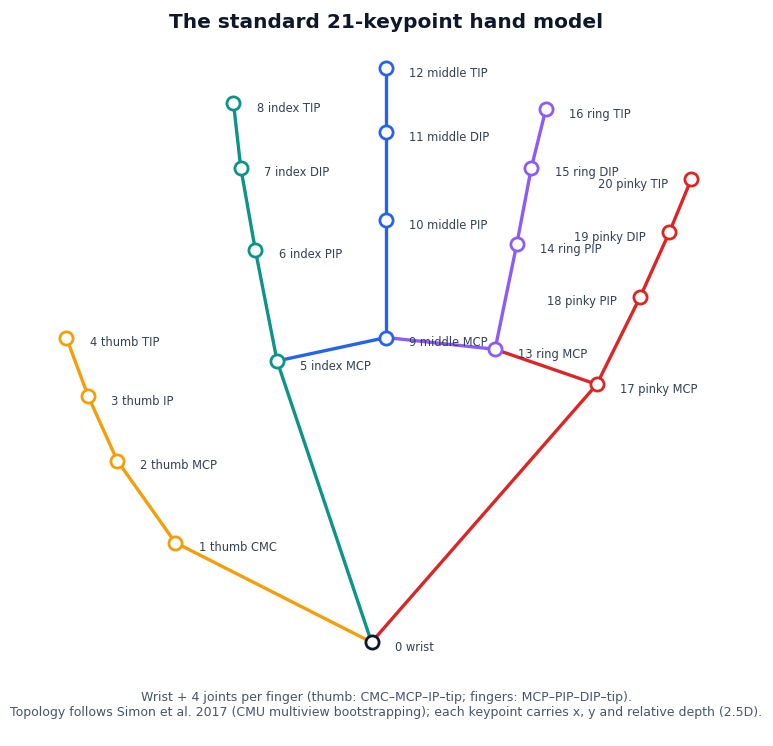
The output is 2.5D: x and y are image-plane positions, while z is depth relative to the wrist, learned from synthetic training renders — it is not an absolute distance to the camera. That relative depth is still useful: it tells you which way fingers curl and roughly how a pinch closes.
Why two stages instead of one big model
The split between detection and tracking is what makes real-time webcam hand tracking cheap. Detection — "where in this whole image is a hand?" — is expensive, because hands can appear anywhere at a roughly 20× range of sizes. Tracking — "the hand was here last frame, what is its pose now?" — only needs to process one small, already-aligned crop.
MediaPipe exploits that asymmetry: the palm detector runs only on the first frame or when tracking confidence drops, and in between, this frame's crop is derived from last frame's landmarks. Because the crop is rotated and scaled to a canonical pose before regression, the landmark model never has to learn rotation or scale invariance — so a tiny network of 1–4 million parameters is enough where a whole-frame architecture would need to be far larger.
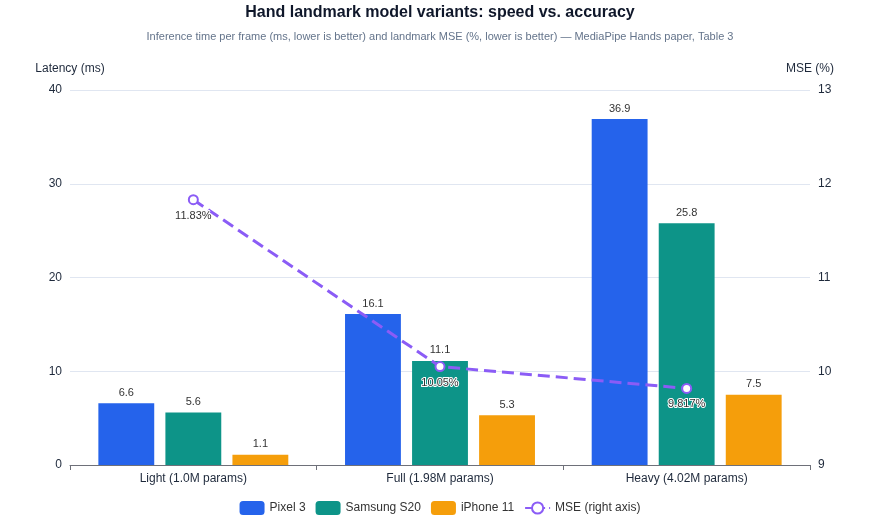
The published speed–accuracy trade-off gives developers three operating points. The paper's measurements (per-frame inference, landmark model only):
| Variant | Params | Pixel 3 | Samsung S20 | iPhone 11 | Landmark MSE |
|---|---|---|---|---|---|
| Light | 1.0M | 6.6 ms | 5.6 ms | 1.1 ms | 11.83% |
| Full | 1.98M | 16.1 ms | 11.1 ms | 5.3 ms | 10.05% |
| Heavy | 4.02M | 36.9 ms | 25.8 ms | 7.5 ms | 9.82% |
Bottom line: Full is the sweet spot — Heavy more than doubles the latency of Full for only about 0.2 points of MSE. And for the complete pipeline, Google's current official benchmark is 17.12 ms on CPU and 12.27 ms on GPU (Pixel 6): comfortably inside a 60 fps frame budget on mainstream hardware.
The browser side got fast through two generations of web technology: TensorFlow.js first ported the model in 2020 with a WebAssembly backend that gained SIMD and multithreading (Google reported up to 10× speedups), and the current MediaPipe Tasks API runs through WASM plus a GPU delegate, with WebGPU pushing inference further still.
From 21 landmarks to music
Landmarks arrive as normalized coordinates in [0, 1], which makes mapping them to sound almost comically direct — this is the design pattern our gesture synthesizer guide describes from the player's side:
- Position → pitch and tone. Hand x is scaled onto a pitch field (usually quantized to a scale, so every position is in key) and hand y drives a filter cutoff or volume — the same layout as a theremin's two antennas.
- Geometry → gates. The Euclidean distance between landmark 4 (thumb tip) and landmark 8 (index tip), normalized by hand size, becomes a pinch gesture that gates notes on and off with hysteresis so they don't flicker.
- Smoothing → playability. Per-frame landmarks jitter, and a 1 Hz tremble in pitch is immediately audible. The standard fix is the One Euro filter: a low-pass filter whose cutoff adapts to hand speed — heavy smoothing when the hand is still, almost no lag when it moves fast.
A minimal landmarks-to-sound mapping fits in a few lines — copy this sketch and tune the [bracketed] values:
// Minimal landmarks → sound sketch (21-keypoint hand model)
const p = hand[9];                        // middle-finger MCP, normalized 0..1
osc.frequency.value = [MIN_HZ] * 2 ** (p.x * [OCTAVES]);
filter.frequency.value = [MIN_CUTOFF] + (1 - p.y) * ([MAX_CUTOFF] - [MIN_CUTOFF]);
const pinch = dist(hand[4], hand[8]) / handSize(hand);  // thumb tip ↔ index tip
if (pinch < [PINCH_ON]) gateOn();                      // hysteresis gate
else if (pinch > [PINCH_OFF]) gateOff();
End-to-end latency is a budget: camera exposure and readout, frame delivery, ~5–17 ms of model inference, smoothing, and one display vsync. Keeping frames on the GPU, running inference off the render loop, and requesting a 60 fps camera are the usual mitigations — and Web Audio's lookahead scheduling keeps control-rate jitter from becoming audio artifacts.
The settings that matter most, as a copy-down checklist:
| Setting | What to use | When | Notes |
|---|---|---|---|
| Camera frame rate | 60 fps | Fast musical passages | Request it in getUserMedia constraints; many webcams fall back to 30 |
| Inference backend | GPU delegate / WebGPU | Capable devices | Published Pixel 6 benchmark: 12.27 ms GPU vs 17.12 ms CPU (~30% lower) |
| Inference thread | Web worker | Always | Keeps the render loop from blocking during inference |
| One Euro fc_min | ≈1 Hz to start | Still or slow hands | Lower smooths more jitter but adds lag |
| One Euro β | Raise above default | Quick pitch jumps | Higher cuts lag at the cost of some jitter |
Bottom line: start with a 60 fps camera request, GPU inference in a worker, and a One Euro filter at fc_min ≈ 1 Hz — then raise β only if fast passages feel laggy.
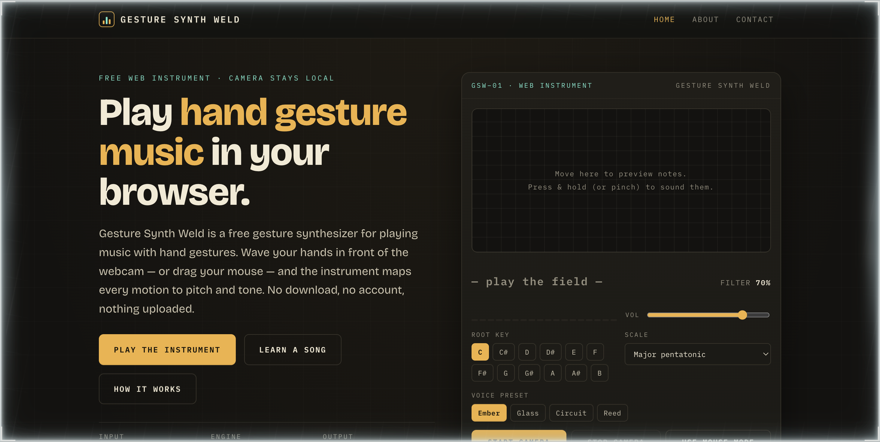
Feel it yourself: play the gesture synth
How accurate is webcam hand tracking?
Accurate enough to build instruments on, and the numbers are public. Google's 2021 model card reports average palm-size-normalized error (MNAE) of 12.02% (Lite) and 10.09% (Full) across 700 images spanning 14 geographical subregions, with no error pattern found across regions; on a separate skin-tone × gender set, average error was 5.67% (Lite) and 5.08% (Full) — close to the 3.8–6.0% disagreement between human annotators labeling the same data. Independent studies put real-world positional error in the millimetre-to-centimetre range depending on setup, and consistently find dedicated depth or infrared sensors more precise at close range. For pointing, gesturing, and playing a scale-quantized instrument, a webcam is comfortably sufficient.
The honest limitations
Single-camera tracking has real failure modes, and we'd rather name them than oversell:
- Lighting. Google's model card lists low light and motion blur as untested conditions, and a lighting-controlled study saw gesture accuracy fall from 97.7% in bright light to 89.1% under 100 lux. Fix: face a lamp or window; never backlight yourself.
- Occlusion. A single camera cannot see through your hand. The model copes with partial self-occlusion up to a point, but fingers hidden behind the palm are guesses. Fix: keep your hand open toward the camera.
- Hand speed. Fast motion blurs the frame (exposure stretches in low light) and can outrun the tracker's predicted region, forcing a costly re-detection. Fix: deliberate movement; a 60 fps camera helps.
- Camera quality. A clean 1080p60 sensor gives the detector more signal than a compressed 720p30 webcam — and a larger hand in frame tracks better.
This is also why Gesture Synth Weld ships a mouse and touch mode with identical sound: when the camera struggles, the music doesn't stop.
Privacy: tracking that never leaves your device
On-device hand tracking is private by architecture rather than by promise. getUserMedia delivers frames to the page, the model converts them to 63 numbers per hand inside your browser process, and the raw video is discarded — there is no upload step to secure. The browser adds its own guarantees: per-site permission prompts, a visible capture indicator, HTTPS-only access, and revocable consent. On our privacy policy this is stated plainly: frames are processed locally, never recorded, and the microphone is never requested. The one honest caveat: on-device processing removes the transmission and third-party-storage risks, but you should still grant camera access only to pages you trust — the permission prompt is the gate.
A short history: from Kinect to a browser tab
Consumer hand tracking began with dedicated depth hardware. Microsoft's Kinect (2010) projected structured infrared light to compute depth at 30 Hz and sold approximately 35 million units; the Leap Motion Controller (2013) used two IR cameras at ~200 fps for sub-millimetre fingertip precision in a desktop-sized volume. Both needed special hardware. The pivot to ordinary cameras came from research: CMU's 2017 multiview-bootstrapping work established the 21-keypoint hand model from single RGB images, and Google's MediaPipe Hands (2019) proved it could run in real time on a phone GPU. The final step was the browser: TensorFlow.js handpose put the model behind a JavaScript call in March 2020, and WASM-SIMD, multithreading, and WebGPU turned that demo into a production platform. Each step traded a little precision for an order of magnitude more accessibility — which is why a gesture-controlled instrument can now be just a URL.
A 5-point self-check for smooth tracking
Before blaming the model, verify these five things — each takes seconds:
- Your face and hand are lit from the front (window or lamp in front of you, not behind).
- Your whole hand stays inside the camera frame, roughly 30–80 cm from the lens.
- Only one browser tab is using the camera (check the browser's capture indicator).
- Movements are deliberate; if notes jump, slow down before changing anything else.
- On the gesture synth, the skeleton overlay tracks all five fingers steadily for five seconds.
FAQ
How does hand tracking work with just a webcam?
Webcam hand tracking works by running two small neural networks on the video feed: a palm detector finds the hand in the frame, and a landmark model predicts 21 keypoints — the wrist plus four joints per finger — inside the detected hand region. Modern implementations like MediaPipe Hands do this on every frame, in real time, entirely on your own device.
What is MediaPipe Hands?
MediaPipe Hands is Google's open-source hand-tracking solution: a two-stage machine-learning pipeline that detects palms and then regresses 21 hand landmarks per hand in real time on ordinary hardware. It was published in 2020 and now ships as the Hand Landmarker task for web, Android, iOS, and Python, making it one of the most widely used webcam hand-tracking implementations.
Does webcam hand tracking work in a browser without downloads?
Yes. Browser hand tracking runs through standard web technology: getUserMedia delivers camera frames to the page, and the tracking model executes via WebAssembly or the GPU (WebGL/WebGPU) inside the tab. Nothing is installed — a gesture synth like Gesture Synth Weld or any MediaPipe-based demo works the moment you allow camera access.
How many keypoints does hand tracking detect?
The standard hand model detects 21 keypoints per hand: one wrist point plus four joints for each of the five fingers. Each keypoint carries an x and y image position and a relative depth value with respect to the wrist, which is why the output is called 2.5D rather than full 3D.
Is webcam hand tracking accurate?
Yes, for interaction and music control. Google's model card reports average normalized landmark error of about 10% of palm size for the Full model, and independent validation studies measure real-world positional error in the millimetre-to-centimetre range. Dedicated depth or infrared hardware is still more precise at close range, but a plain webcam is accurate enough to play instruments, click, and gesture.
Can webcam hand tracking match a dedicated sensor like a Leap Motion?
No, not on raw precision. Published metrology on the Leap Motion infrared controller measured static precision under 0.5 mm, while single-webcam tracking error sits in the millimetre-to-centimetre range depending on setup. The webcam wins on availability and working range — it is already built into your laptop — which is why it suits instruments and UI control rather than sub-millimetre measurement.
Why does hand tracking jitter or lose my hand?
Jitter comes from per-frame prediction noise, and tracking loss usually comes from lighting, occlusion, or speed. Each frame is predicted independently, so small errors show up as trembling; apps smooth this with a One Euro filter. Dim light, a hand covering itself, or motion faster than the camera's exposure can also push the hand outside the tracker's predicted region and force a re-detection.
Does hand tracking work in low light?
It works, but measurably worse. In one lighting-controlled study of a MediaPipe-based gesture layer, recognition accuracy fell from 97.7% in bright light to 89.1% in dim light under 100 lux, and Google's model card lists low light and motion blur as untested conditions. Facing a lamp or window so your hand is evenly lit is the single most effective fix.
Does hand tracking work in the dark?
No. In a fully dark room the camera sensor receives too little light and the palm detector fails outright, so tracking stops. Dim rooms still work with reduced accuracy, and a single desk lamp facing you is usually enough to restore normal tracking.
Is webcam hand tracking private?
On-device hand tracking is private by architecture: the camera frames are analyzed inside your browser and never need to leave your device. Only the abstract output — 21 sets of coordinates per hand — is used by the app. Browsers add their own guarantees: camera access requires your explicit permission per site, shows a capture indicator, and can be revoked at any time.
Do I need a special camera for hand tracking?
No. Modern hand tracking works with any ordinary RGB webcam, laptop camera, or phone camera — no depth sensor or infrared hardware is required. A cleaner 1080p camera gives the model slightly more signal than an old 720p sensor, but the models were designed for exactly the cameras already built into everyday devices.
Sources and scope
This article is our own original explainer, written from hands-on experience building a MediaPipe-based instrument. Technical claims are grounded in primary sources linked above: the MediaPipe Hands paper (CVPRW 2020) for architecture and speed, Google's official Hand Landmarker documentation and 2021 model card for benchmarks and fairness data, MDN for the camera API, and peer-reviewed validation studies for real-world accuracy. Figures are drawn from the same published data. Where numbers vary by device, we cite the device.
Further reading
- Gesture Synth Weld: play the instrument — hand tracking turned into music, free in your browser.
- What is a gesture synthesizer? — the player's guide to the instrument this pipeline powers.
- The gesture map — exactly how the 21 landmarks become pitch, filter, and note gates.
- Camera privacy — how local hand tracking keeps video on your device.
- About the project — how the instrument is built, including the tracking stack.
Try everything you just read
The fastest way to understand this pipeline is to feel it working on your own hand:
- ✓ Free, no download, no account
- ✓ 21-keypoint hand tracking, processed locally in your browser
- ✓ Scale-quantized pitch, chords, and guided songs included
No camera, or poor lighting? Use mouse or touch mode
- ✓ Identical sound engine — nothing musical is lost
- ✓ Works on phones, tablets, and trackpads
- ✓ The same pitch field, so every concept above still applies
About the author
The Gesture Synth Weld team builds free, privacy-first web instruments. We work with webcam hand tracking daily — it powers the gesture synth on this site — and we write from that implementation experience rather than from theory. We are a small independent project, not a research lab; our focus is making the technology understandable and playable. Follow the project on X and YouTube.